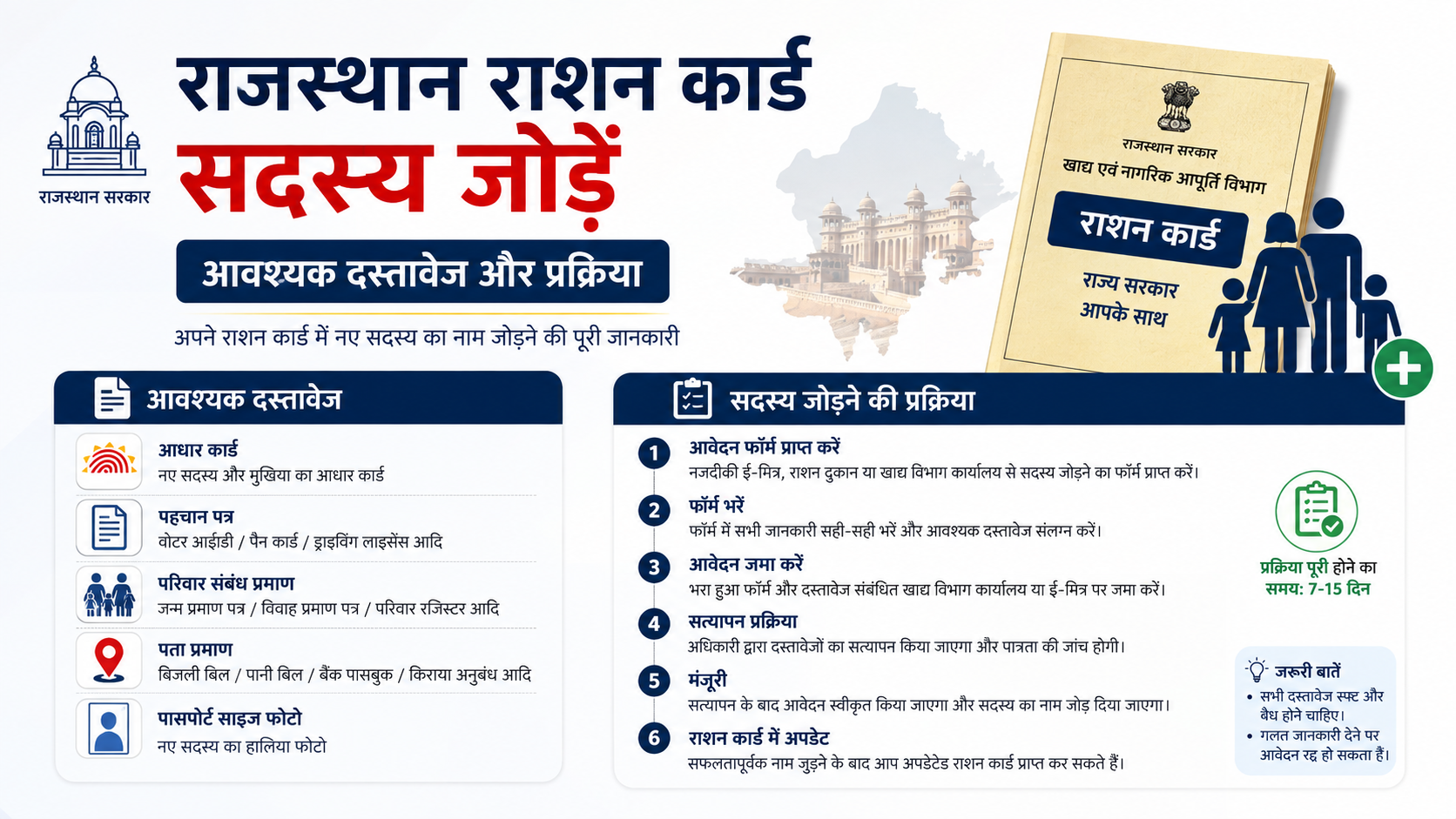
Adding a child, spouse, or another eligible family member to a Rajasthan ration card requires more than simply entering a name online. The Food Department’s ration-card service and the Jan Aadhaar record must contain accurate, matching family details. This guide explains the practical process for a ration card member add Rajasthan request, the documents to keep ready, how Jan Aadhaar e-KYC affects the application, and what to do if the request does not move forward.
The official Rajasthan ration-card portal provides a dedicated online form for adding a new member. Jan Aadhaar also has a separate member-addition and verification process, which is important because ration-card and NFSA information is sourced from ration services rather than edited directly in Jan Aadhaar.
Key Takeaways
- Use the official Rajasthan ration-card portal’s “Add New Member” service for a ration-card name-addition request.
- Keep the existing ration-card number and the new member’s identity, age, and relationship documents ready.
- Update or add the person in Jan Aadhaar where necessary; Jan Aadhaar edits require verification and are not automatically approved.
- Aadhaar e-KYC is compulsory in Jan Aadhaar for family members above five years of age.
- A child below five may use a Rajasthan-issued birth certificate for Jan Aadhaar e-KYC; otherwise Aadhaar is used.
- Adding a person to a ration card does not by itself guarantee NFSA eligibility or additional foodgrain entitlement.
Understand the Difference Between a Ration Card, Jan Aadhaar, and NFSA
Before submitting a request, it is useful to distinguish the records involved.
A Rajasthan ration card is the household record used for public-distribution-system services. The Rajasthan government’s ration-card portal has a specific service titled “राशन कार्ड में नए सदस्य का नाम जोड़ने के लिए आवेदन पत्र” (application form to add a new member’s name to a ration card).
Jan Aadhaar is Rajasthan’s family-identity database. It records household and member details, and its data can be updated through the citizen’s SSO account or an e-Mitra kiosk. The Jan Aadhaar Authority states that adding a member is an update that must be verified by authorised verifiers; it is not automatically verified.
NFSA status is separate from merely having a ration-card entry. The Jan Aadhaar FAQ specifically says that NFSA and ration-card numbers cannot be updated directly in Jan Aadhaar because they are obtained from ration services. Therefore, do not assume that a successful Jan Aadhaar update alone changes ration-card or NFSA records.
Who May Need to Add a Member?
A ration card member add Rajasthan application is generally relevant when a person has become part of the household but is missing from the current card. Common situations include:
- Birth of a child.
- Marriage, when a spouse moves into the household.
- A dependent family member joining the household.
- A person whose family record was previously incomplete.
- A member being transferred from another Jan Aadhaar family, where applicable.
The correct route depends on the situation. If a person is already present in another family’s Jan Aadhaar record, a member transfer may be more appropriate than treating the person as entirely new. If a household is separating, the Jan Aadhaar family split facility may be relevant instead.
For a deceased person or a person who has permanently moved away, use the applicable deletion or transfer process rather than creating duplicate records. Duplicate or conflicting identity data can delay verification.
Documents Required for Ration Card Member Addition
The Food Department’s online form should be treated as the final authority for fields and uploads in an individual application. Requirements can vary with the member’s age and the reason for addition. Prepare clear scans or photographs of the following documents before starting.
| Document | Why it is useful | Typical situation |
|---|---|---|
| Existing ration card number/details | Identifies the household where the member is to be added | Required to begin the ration-card request |
| Jan Aadhaar family ID/details | Helps ensure the household record is correctly linked | Recommended for all applications |
| Aadhaar details of the member | Identity and e-KYC for eligible ages | Members above five years; also relevant in other cases |
| Birth certificate | Establishes a young child’s date of birth | Newborns and children, especially below five |
| Proof of relationship or household connection | Supports the reason for addition | Marriage, guardianship, dependent-member cases |
| Address proof, if relevant | Supports residence details where the record has changed | Change of residence or a new household arrangement |
| Existing Jan Aadhaar/ration-card documents | Helps resolve inconsistencies | Where data does not match across systems |
For Jan Aadhaar, the Rajasthan government lists Aadhaar numbers for the head of family and members above five years, bank details of the head of family, age/date-of-birth proof, address proof, and a photograph plus birth certificate or Aadhaar for children up to five years. Address proof may include an electricity bill, water bill, Aadhaar card, PAN card, or passport.
Special document considerations
For a newborn or child below five: Keep the birth certificate ready. The Jan Aadhaar Authority states that a child below five can complete e-KYC through a birth certificate if it was issued in Rajasthan; if the birth certificate was issued outside Rajasthan, Aadhaar e-KYC applies.
For a member above five: Aadhaar e-KYC is required for Jan Aadhaar editing or updating. Ensure that the name, date of birth, gender, and photograph are accurate in Aadhaar before proceeding, because e-KYC draws these details from Aadhaar authentication.
For a spouse or transferred member: First confirm whether the person appears in another Jan Aadhaar family. A transfer may be necessary to prevent the same person from being represented in incompatible household records.
Step-by-Step: Submit the Ration Card Member Add Rajasthan Request
1. Check the current household details
Begin by reviewing the existing ration card and Jan Aadhaar family record. Confirm:
- The ration-card number is available.
- The district selected for the ration card is correct.
- The proposed member’s spelling, date of birth, and Aadhaar information are consistent.
- The member is not incorrectly retained in another household record.
This preliminary check is important because mismatched names or dates can lead to authentication or verification problems.
2. Complete Jan Aadhaar e-KYC or member update, if needed
Use your own SSO ID or visit an e-Mitra kiosk to access Jan Aadhaar services. The official Jan Aadhaar FAQ states that residents can modify or update information through either route, after updating the Jan Aadhaar number in the SSO profile.
For members above five years, complete Aadhaar e-KYC. The official e-KYC guidance says an edit or update in Jan Aadhaar is possible only after Aadhaar e-KYC. Use the Family e-KYC option through SSO or get assistance at an e-Mitra kiosk.
If the system displays “No data found” in the add-member module, first check whether the adult member’s e-KYC is updated. The Jan Aadhaar FAQ directs users to complete Family e-KYC before trying again.
3. Open the official Food Department service
Go to the Rajasthan ration-card portal: rrcc.rajasthan.gov.in.
Select the service for adding a new member to a ration card. The official application page begins by asking for the district and ration-card number. Enter these details carefully, exactly as shown on the existing card.
Avoid relying on unofficial videos, social-media links, or look-alike websites that ask for personal information or payment.
4. Enter the new member’s details
Fill in every requested field accurately. The information should align with the supporting documents and Jan Aadhaar record. Review the following closely before submission:
- Full name and spelling.
- Date of birth.
- Gender.
- Relationship with the head of family.
- Aadhaar or birth-certificate details, where requested.
- Address and household information.
- Mobile number used for application communication, if the portal asks for one.
Do not guess a date of birth, relationship category, or document number. If a document is being corrected, complete that correction first where required.
5. Upload documents and submit
Upload only legible, valid documents asked for by the form. Blurred images, cropped certificates, or mismatched details can result in a pending or rejected application.
After final review, submit the form and save the acknowledgement, application number, or any reference number generated by the portal. This is essential for tracking and for follow-up with the relevant office or e-Mitra centre.
6. Track the application status
The Rajasthan ration-card portal also provides a separate status service for new-member addition applications. Use the acknowledgement or reference details from your submission to check progress.
Do not submit repeated applications while the first one is pending unless an authorised official or e-Mitra operator confirms that the original application must be withdrawn or replaced. Multiple requests can create avoidable confusion.
Verification: Why the Update May Take Time
A submitted request is not necessarily an approved update. Jan Aadhaar’s official process includes verification for modifications and additions. The authority describes a two-level system:
- In rural areas, first-level verification is performed by the Village Development Officer and second-level verification by the Block Statistical Officer.
- In urban areas, first-level verification is performed by the Executive Officer and second-level verification by the Subdivision Officer.
The Jan Aadhaar Authority separately lists Add Member among the changes that require verifier approval and will not be automatically verified.
Because verification depends on records and local processing, avoid assuming a fixed approval date unless the Food Department formally provides one for your application.
Common Problems and How to Avoid Them
Aadhaar and Jan Aadhaar details do not match
Differences in spelling, date of birth, gender, or photographs can interrupt e-KYC. Resolve the incorrect source record before repeatedly submitting the application.
The new member is already in another family record
Use the Jan Aadhaar member-transfer procedure where applicable. Adding the same person afresh may cause a conflict.
e-KYC is incomplete
For members above five, complete Aadhaar e-KYC before an edit or add-member request. If an e-KYC attempt is interrupted, the official Jan Aadhaar FAQ notes that the Aadhaar may be blocked for further Jan Aadhaar activity for six hours; resume after that period rather than repeatedly retrying immediately.
Ration-card and NFSA expectations are confused
A name addition is a household-record request. It should not be represented as automatic NFSA inclusion, a guarantee of foodgrain quantity, or an immediate change in entitlement. Verify NFSA-related status through Food Department services.
No acknowledgement saved
Always download, print, or photograph the acknowledgement screen. Without the application reference, status checks and escalation become harder.
When to Use e-Mitra or Seek Official Help
Use an e-Mitra kiosk if you do not have an SSO ID, need assistance with document uploads or Aadhaar authentication, or cannot complete the Jan Aadhaar update independently. Jan Aadhaar enrollment and member addition through an enrolled Jan Aadhaar record are free when completed through the user’s own SSO ID; an e-Mitra request may carry the government-prescribed service charge.
For Jan Aadhaar assistance, the official authority lists the Rajasthan helpline 181 and its support number 0141-2850287. For ration-card-specific matters, use the Food Department portal or the local authorised channel shown in your application acknowledgement.
Frequently Asked Questions
Can I add a newborn child to a Rajasthan ration card?
Yes, a newborn can be added through the appropriate ration-card member-addition request. Keep the child’s birth certificate ready. For Jan Aadhaar e-KYC, a child below five can use a Rajasthan-issued birth certificate; if the certificate was issued outside Rajasthan, Aadhaar e-KYC is used.
Is Aadhaar mandatory for a ration card member add Rajasthan request?
Aadhaar e-KYC is mandatory in Jan Aadhaar for family members above five years of age. For children below five, the applicable route depends on the place of birth-certificate issue, as set out in the Jan Aadhaar e-KYC guidance. Follow the current requirements displayed in the official application form for uploads.
Can I update the ration card number directly in Jan Aadhaar?
No. The official Jan Aadhaar FAQ says NFSA and ration-card numbers cannot be updated directly in Jan Aadhaar because this information is obtained from ration services. Use the Food Department’s ration-card service for ration-card updates.
How do I apply online without visiting e-Mitra?
Use your SSO ID to access Jan Aadhaar citizen services, complete any required e-KYC or member update, and submit the ration-card addition request through the official Rajasthan ration-card portal. Keep the acknowledgement number after submission.
Why is my add-member request still pending?
Pending status can result from incomplete e-KYC, mismatched documents, a member already appearing in another family record, or verification still being in progress. Check the application status, review Jan Aadhaar e-KYC, and use the acknowledgement details when seeking assistance.
Conclusion
For a successful ration card member add Rajasthan application, start with correct identity and family data, complete Jan Aadhaar e-KYC where required, and submit the request through the official Rajasthan ration-card portal. Keep the existing ration-card number, supporting documents, and acknowledgement safely stored. Finally, track the request through the official status service and remember that adding a household member does not automatically confirm NFSA entitlement.













