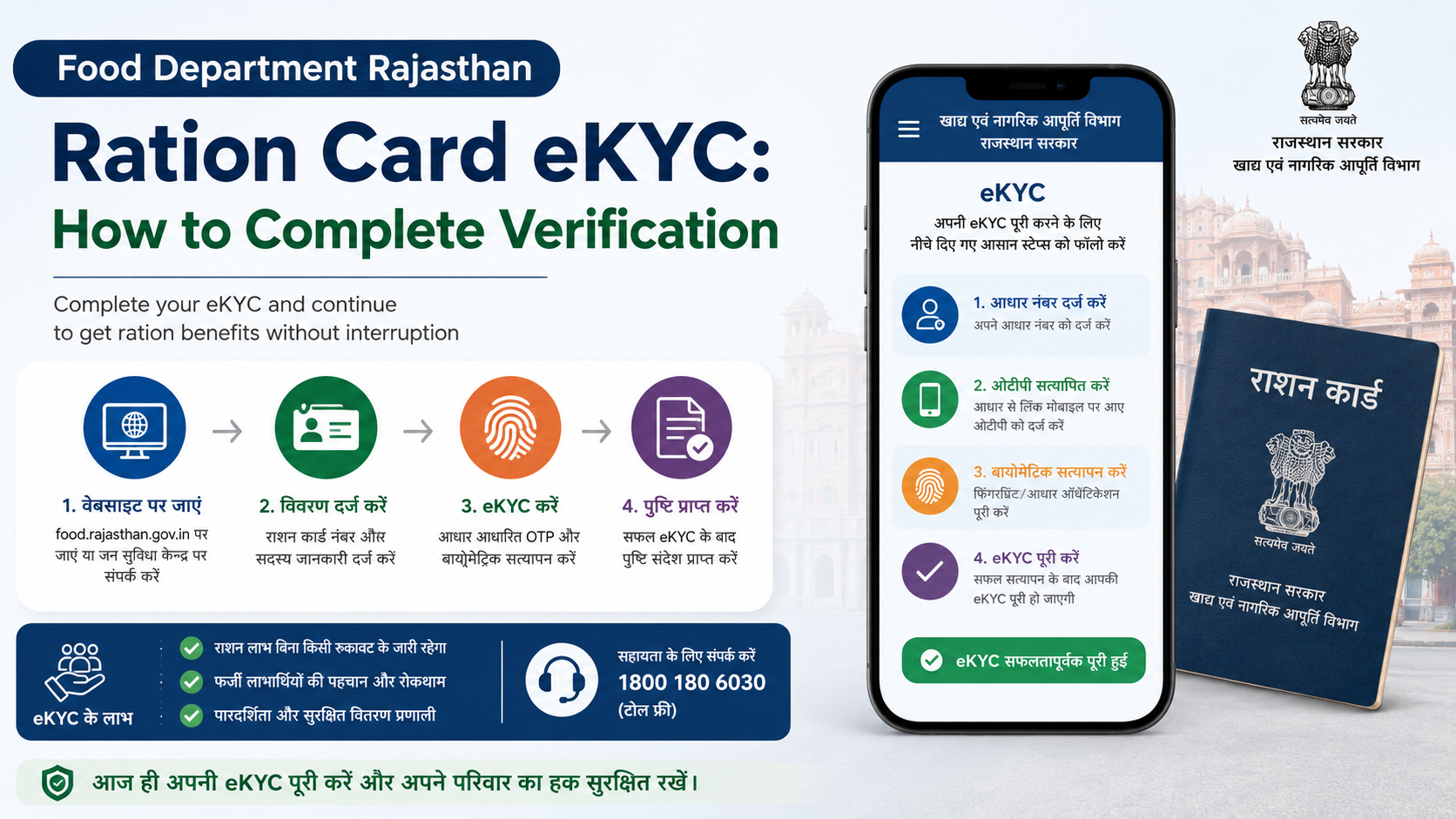
If your Rajasthan ration card or NFSA record shows that eKYC is pending, completing verification helps ensure that the beneficiary data connected with the Public Distribution System (PDS) is accurate. The practical route is usually through your Fair Price Shop (FPS), where Aadhaar-based authentication is performed on the ePoS device.
This guide explains the food department ration card eKYC process, what to carry, how verification works, how to check linked-status information, and what to do if Aadhaar authentication fails. It also clarifies an important distinction: ration-card eKYC and Jan Aadhaar eKYC are connected in practice but are separate government services.
Key Takeaways
- Rajasthan’s Food Department provides an official facility to view Aadhaar seeding, eKYC, LPG ID and Jan Aadhaar mapping status.
- NFSA ration-card members can generally initiate Aadhaar-based eKYC at a Fair Price Shop using the ePoS device.
- Each family member listed on the ration card may need to be verified individually.
- Aadhaar seeding and successful eKYC are not necessarily the same thing; check both statuses.
- If biometric authentication fails, ask the FPS dealer or local Food Department office about the next verification step.
- Jan Aadhaar eKYC can be completed through an e-Mitra centre or an SSO ID; it should not be confused with ration-card eKYC.
What Is Food Department Ration Card eKYC?
eKYC means electronic Know Your Customer verification. In the PDS context, it uses Aadhaar authentication to validate a beneficiary’s basic identity details against the ration-card database.
The central Department of Food and Public Distribution describes PDS eKYC as a process in which Aadhaar authentication provides basic demographic information—such as name, address, date of birth, gender and photograph—to the state food department for validation. The department then compares this information with its PDS records.
In Rajasthan, ration distribution is handled through Fair Price Shops using electronic Point of Sale (ePoS) devices. These devices can use biometric authentication methods such as fingerprint or iris authentication. The Rajasthan Food Department’s public portal also includes a dedicated option to view Aadhaar seeding, eKYC, LPG ID and Jan Aadhaar mapping details.
The purpose is data accuracy. It helps the department identify whether the person listed on the ration card matches the beneficiary record used for foodgrain distribution.
Ration Card eKYC and Jan Aadhaar eKYC Are Different
Many applicants use “ration card eKYC” and “Jan Aadhaar eKYC” interchangeably. They are related through beneficiary data, but they should be treated as separate processes.
| Service | Main purpose | Where it is generally completed |
|---|---|---|
| Ration card/NFSA eKYC | Validates a PDS beneficiary’s identity against the ration-card record | Fair Price Shop through the ePoS process |
| Jan Aadhaar eKYC | Verifies Jan Aadhaar family/member information through Aadhaar authentication | e-Mitra centre or Rajasthan SSO ID |
| Aadhaar seeding | Links Aadhaar information with the relevant beneficiary record | Through the applicable Food Department or service workflow |
The official Jan Aadhaar portal states that Aadhaar eKYC verifies a member’s photo, date of birth, gender and name through Aadhaar authentication. It also states that Jan Aadhaar eKYC is mandatory for the family head and members above five years of age, while the method for children below five differs according to the birth-certificate and Aadhaar situation.
Do not assume that completing Jan Aadhaar eKYC automatically completes the food department ration card eKYC requirement. Check the ration-card status separately.
Before You Visit the Fair Price Shop
Prepare the details that help the FPS dealer locate the correct beneficiary record quickly.
Keep These Items Ready
Carry or know the following:
- Your Rajasthan ration card number
- Aadhaar number or Aadhaar card for the member being verified
- Jan Aadhaar number, if available
- Mobile phone with the number linked to your records, if applicable
- Details of all household members listed on the ration card
Aadhaar authentication is personal. If multiple household members are listed, it is sensible to ask the FPS dealer whether each member must appear for verification. The central PDS eKYC procedure specifically refers to all household members named on NFSA ration cards visiting the FPS to initiate eKYC.
Check That Names and Details Match
Before starting, compare the spelling of the beneficiary’s name, date of birth and gender across Aadhaar, ration card and Jan Aadhaar records. Small differences can result in a mismatch during departmental validation.
Examples include:
- A surname written differently in Aadhaar and the ration card
- An old date of birth in one record
- A family member added to Jan Aadhaar but not yet reflected in the ration-card record
- Aadhaar linked to the wrong family member
If a record is incorrect, do not attempt to solve it by using another person’s Aadhaar or biometric authentication. Ask for the appropriate correction workflow.
How to Complete Food Department Ration Card eKYC
The standard beneficiary-facing route is to visit the Fair Price Shop attached to your ration card. eKYC may also be offered while foodgrains are being distributed.
Step 1: Visit Your Fair Price Shop
Go to your assigned FPS during its working hours. Rajasthan’s Food Department portal provides facilities to find details of attached and nearby Fair Price Shops.
If the shop is busy on ration-distribution days, ask the dealer whether a separate slot is available for eKYC. The central suggested procedure allows FPS operators to facilitate eKYC at non-peak times so that foodgrain distribution is not disrupted.
Step 2: Request Ration Card eKYC
Tell the FPS dealer that you want to complete or confirm eKYC for the ration-card member. Provide the ration card and Aadhaar details requested by the operator.
If Aadhaar has already been seeded in the ration-card record, the dealer can initiate the eKYC request through the ePoS device. If it has not been seeded, the process may first require Aadhaar to be linked provisionally through the authorised workflow.
Step 3: Complete Aadhaar Authentication
The ePoS device may request fingerprint or iris authentication. Rajasthan’s e-PDS system uses Aadhaar and Jan Aadhaar-linked beneficiary records and supports biometric authentication at the point of distribution.
Follow the device instructions carefully:
- Use clean, dry fingers for fingerprint authentication.
- Remove excessive oil, dust or moisture before scanning.
- Allow the dealer to retry if the first scan fails.
- Use an alternative authorised authentication method if the operator confirms it is available.
Never share Aadhaar OTPs, copies of Aadhaar or biometric information with unauthorised persons.
Step 4: Confirm Submission
A successful biometric match generally means the eKYC request has been submitted. However, submission and final approval can be different stages.
The central procedure states that the food department may compare Aadhaar-sourced details with PDS records and flag mismatches for physical verification. Therefore, do not rely only on a verbal confirmation. Ask whether the screen shows a successful submission and later check the status through the official Rajasthan Food Department facility.
Step 5: Repeat for Other Listed Members
Where required, other household members should visit the FPS and complete their own authentication. This is particularly important when the record shows pending eKYC for more than one person.
How to Check Rajasthan Ration Card eKYC Status
The Rajasthan Food Department homepage includes a public-information option labelled for Aadhaar seeding, eKYC, LPG ID and Jan Aadhaar mapping status.
To use the official route:
- Visit the Rajasthan Food Department portal.
- Locate the public-information link for Aadhaar seeding, eKYC, LPG ID and Jan Aadhaar mapping status.
- Enter the requested ration-card or beneficiary details.
- Review the status for each member, where displayed.
- If the result is unclear, take note of the ration card number and contact the FPS or Food Department office.
The Jan Soochna Portal also offers ration-card-related public information, including ration card details, NFSA beneficiary information and Aadhaar-seeding-related information.
What the Status Can Tell You
Status labels can vary by portal screen and record type, but the important points to check are:
- Whether Aadhaar is seeded
- Whether eKYC is completed or pending
- Whether Jan Aadhaar is mapped
- Whether an LPG ID mapping field is shown
- Whether any member’s record differs from the rest of the household
If one person’s verification is pending, address that individual record rather than assuming the entire family card is complete.
What to Do If eKYC Fails or Shows a Mismatch
A failed fingerprint scan does not automatically mean that you are ineligible for ration benefits. The central eKYC procedure specifically says that a genuine beneficiary should not be denied foodgrains solely because biometric authentication has failed. Repeated failure cases may be marked for physical verification.
Biometric Authentication Failure
If the device cannot authenticate your fingerprint:
- Request a retry after cleaning and drying your fingers.
- Ask whether iris authentication or another authorised method is available.
- Ask the FPS dealer to record the failed attempt correctly.
- Contact the local Food Department office if repeated attempts fail.
- Keep your ration card and Aadhaar details available for any physical verification.
Do not pay an unofficial fee for a biometric retry or for an unverified “instant approval” service.
Aadhaar Is Not Seeded
If Aadhaar is not linked to the ration-card record, ask the authorised FPS dealer or Food Department office about the prescribed seeding process. Use only official channels. Aadhaar seeding may need to be completed before or alongside the eKYC request.
Name, Date of Birth or Family-Member Details Are Wrong
Correct the underlying record through the responsible service:
- For Jan Aadhaar corrections, use the official Jan Aadhaar route through e-Mitra or SSO.
- For ration-card or NFSA record issues, approach the Food and Civil Supplies Department or the local authorised office.
- For an Aadhaar demographic correction, use UIDAI’s authorised update process.
The Jan Aadhaar portal notes that if the wrong Aadhaar number is seeded in a Jan Aadhaar family, correction for Aadhaar eKYC can be handled through a Second Level Verifier.
Important Safety and Service Tips
Use a cautious approach when completing any Aadhaar-linked government service.
- Prefer an authorised Fair Price Shop, e-Mitra centre or official government portal.
- Do not give biometrics to a private agent outside the authorised process.
- Do not share Aadhaar OTPs over calls, messages or social media.
- Keep any receipt, acknowledgement or status screenshot until the record is confirmed.
- Check every family member’s status where the portal displays member-wise information.
- Contact the official department if an operator asks for an unexplained charge.
For e-Mitra service-charge complaints, the official e-Mitra portal lists the toll-free number 1800-180-6127. The Rajasthan Food Department lists 0141-2227352 during working hours and the email addresses secy-food-rj@nic.in and afcfood-rj@nic.in.
Frequently Asked Questions
Can I complete food department ration card eKYC online?
The Rajasthan Food Department publicly provides a status-check facility for Aadhaar seeding, eKYC, LPG ID and Jan Aadhaar mapping. For beneficiary authentication, the practical PDS route is generally the Fair Price Shop ePoS device. Do not assume that a status portal itself completes biometric ration-card eKYC.
Is Jan Aadhaar eKYC the same as ration card eKYC?
No. Jan Aadhaar eKYC verifies Jan Aadhaar family/member data, while ration-card eKYC validates PDS beneficiary details. Complete and check each service separately if your records indicate that both are required.
What should I do if my fingerprint does not work at the FPS?
Ask for a retry and enquire about other authorised authentication options. If repeated biometric attempts fail, contact the local Food Department office. The central PDS eKYC procedure provides for failed cases to be flagged for physical verification and says genuine beneficiaries should not be denied foodgrains merely because biometric authentication fails.
Do all family members need to complete eKYC?
The eKYC process is member-specific. The central PDS procedure refers to all household members named on NFSA ration cards visiting the FPS to initiate eKYC. Confirm the pending status of every listed member through the official status facility or at the FPS.
Where can I get help with Jan Aadhaar eKYC?
The official Jan Aadhaar portal states that Jan Aadhaar eKYC can be completed at the nearest e-Mitra centre or through an SSO ID. It lists Jan Aadhaar support at 0141-2850287 and janaadhaarsupport@rajasthan.gov.in.
Conclusion
Food department ration card eKYC in Rajasthan is primarily an Aadhaar-based beneficiary verification process linked to the PDS. Start by checking the official Food Department status facility, then visit your Fair Price Shop with your ration card and Aadhaar details for the authorised ePoS process. Review the status for every household member, keep Jan Aadhaar eKYC separate from ration-card eKYC, and use official Food Department or e-Mitra support if authentication or record-matching problems arise.













